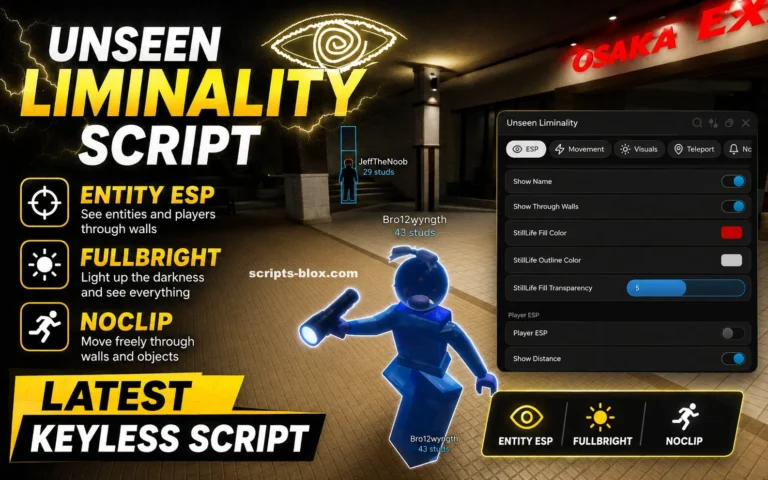
Unseen Liminality Script is a Lua-based Roblox script designed for players who want additional utilities while exploring the mysterious and atmospheric world of Unseen Liminality. The script is commonly used to improve navigation, increase visibility, and provide various movement-related features that make exploration easier throughout the game’s large and maze-like environments.
Unseen Liminality is a popular Roblox horror exploration game inspired by liminal spaces, abandoned buildings, backrooms-style environments, and psychological horror. Players travel through unsettling locations, discover hidden areas, uncover secrets, and avoid dangerous entities lurking throughout the map. Because many areas are massive and difficult to navigate, some players search for scripts that offer exploration and utility features.
The latest Unseen Liminality Script versions often include features such as Auto Explore, WalkSpeed Modifier, Infinite Jump, Fly Mode, Teleport System, Player ESP, Entity ESP, Full Bright, No Fog, Noclip, Anti AFK, Camera Unlock, and many more tools designed to improve exploration.
Table of Contents
What Is Unseen Liminality Script?
Unseen Liminality Script is a custom Lua script developed by third-party creators for the Roblox game Unseen Liminality. It runs through a Roblox executor and provides players with a graphical user interface containing various exploration and utility features.
Instead of manually navigating through large environments and searching for important locations, the script can provide tools that help players move more efficiently, improve visibility, and locate areas of interest throughout the game.
Many script versions are updated regularly to maintain compatibility with Roblox updates and game changes.
Latest Working Scripts
Main Recommended Script
loadstring(game:HttpGet(“https://raw.githubusercontent.com/Raynisis1612/ULU/refs/heads/main/UnseenLiminalityUtilities.lua”))()Alternative Strong Script
loadstring(game:HttpGet(“https://raw.githubusercontent.com/rackyxd/scripts/refs/heads/main/UnseenLiminality”))()Simple / Universal Alternative
loadstring(game:HttpGet(‘https://raw.githubusercontent.com/EdgeIY/infiniteyield/master/source’))()Features Of Unseen Liminality Script
- Auto Explore
- WalkSpeed Modifier
- Infinite Jump
- Fly Mode
- Teleport System
- Player ESP
- Entity ESP
- Full Bright
- No Fog
- Noclip
- Anti AFK
- Camera Unlock
- Custom UI Menu
- Teleport To Locations
- Exploration Tools
- Enhanced Visibility
- Map Navigation Features
- GUI Controls
- Performance Optimization
- Easy Configuration
Why Players Use Unseen Liminality Scripts
Unseen Liminality is built around exploration, discovery, and navigating large atmospheric environments. Some locations can be difficult to find, and visibility is often intentionally limited to create tension.
Players commonly search for scripts because they want:
- Faster exploration
- Easier navigation
- Better visibility
- Faster movement
- Access to hidden locations
- Improved map awareness
- Convenience features
- Reduced time spent searching
- Better entity tracking
- Enhanced exploration tools
These features are often advertised as ways to simplify exploration and make progression more convenient.
Benefits Commonly Advertised
- Faster map traversal
- Easier discovery of hidden areas
- Improved visibility in dark environments
- Better navigation through maze-like locations
- Simplified exploration
- More efficient movement
- Enhanced awareness of surroundings
- Convenient utility features
- Better access to points of interest
- Reduced downtime during exploration
The actual effectiveness of these features depends on the script version and game updates.
How to Use Unseen Liminality Script
Running a script usually follows a simple process.
- Launch Roblox.
- Join the Unseen Liminality game.
- Open a compatible Roblox executor.
- Copy the script from the official website.
- Paste the script into the executor.
- Execute the script.
- Wait for the GUI menu to load.
- Enable features such as ESP, Fly Mode, Noclip, or Full Bright.
Most versions include a user-friendly interface that allows players to customize settings according to their preferences.
Supported Executors
Unseen Liminality Script is commonly advertised as compatible with:
- Delta Executor
- Hydrogen
- Fluxus
- Wave
- Xeno
- Arceus X
- KRNL
- Synapse X
Compatibility may vary depending on updates and platform support.
Why Unseen Liminality Is Popular
Unseen Liminality has become one of the most popular liminal-space horror experiences on Roblox because of its unique atmosphere and exploration-focused gameplay.
Players enjoy:
- Liminal environments
- Horror exploration
- Backrooms-inspired locations
- Hidden secrets
- Atmospheric storytelling
- Entity encounters
- Mysterious locations
- Puzzle-solving
- Exploration challenges
- Psychological horror elements
The combination of mystery and exploration keeps players engaged and encourages repeated playthroughs.
Tips For New Unseen Liminality Players
If you are new to the game, consider the following tips:
- Explore every room carefully.
- Use headphones for better awareness.
- Stay alert for entities.
- Learn the layout of each area.
- Play with friends for a more enjoyable experience.
- Look for hidden points of interest.
- Pay attention to environmental clues.
- Take your time when exploring unfamiliar locations.
These strategies can help improve your overall experience without relying on external tools.
Frequently Asked Questions (FAQs)
What is Unseen Liminality Script?
Unseen Liminality Script is a custom Lua script designed for the Roblox game Unseen Liminality. It provides exploration tools, visibility enhancements, movement features, and various utility functions.
What does the script do?
The script is commonly used to improve exploration through features such as ESP, Full Bright, Fly Mode, Teleportation, Noclip, and movement enhancements.
Is the script free?
Most public versions are available for free, although some private script hubs may offer premium versions with additional features.
Does it work on mobile?
Some versions support Android and iOS executors, although compatibility varies depending on the device and executor.
What is ESP?
ESP is a feature that highlights players, entities, objects, or locations, making them easier to locate throughout the game world.
What does Full Bright do?
Full Bright removes most darkness from the environment, allowing players to see more clearly in dimly lit areas.
Can multiple features run at the same time?
Yes. Most versions allow players to use ESP, Fly Mode, Full Bright, Noclip, and movement features simultaneously.
Is using scripts safe?
Players should understand that using third-party Roblox scripts may involve security risks, compatibility issues, and potential account-related consequences.
Does the script receive updates?
Many active developers release updates regularly to maintain compatibility with Roblox updates and newly added content.
Conclusion
Unseen Liminality Script is a Lua-based Roblox utility script that is commonly associated with features such as Auto Explore, WalkSpeed Modifier, Infinite Jump, Fly Mode, Teleport System, Player ESP, Entity ESP, Full Bright, No Fog, Noclip, Anti AFK, and Camera Unlock. These tools are often used by players looking to simplify exploration and navigate the game’s mysterious environments more efficiently.
Whether you are exploring abandoned locations, searching for hidden secrets, avoiding dangerous entities, or simply enjoying the atmospheric world of Unseen Liminality, the game remains one of Roblox’s most unique horror exploration experiences, offering memorable environments, unsettling mysteries, and immersive gameplay.