My Bus Script is a third-party Roblox tool designed to customize vehicle performance and improve the driving experience in My Bus. Its advertised features include Bus Boost, Overspeed Push, Speed Multiplier, and Brake Multiplier, giving players additional options for adjusting how their buses behave on the road.
My Bus takes players behind the wheel of a city bus in the unusual town of Graybridge. Drivers must pick up passengers, collect fares, follow assigned schedules, and complete different routes while keeping their journeys on track.
As players progress, they can unlock new buses and upgrade important vehicle components, including engines, brakes, and doors. My Bus Script focuses on providing additional vehicle controls that may make driving and route completion more convenient.
Table of Contents
About My Bus
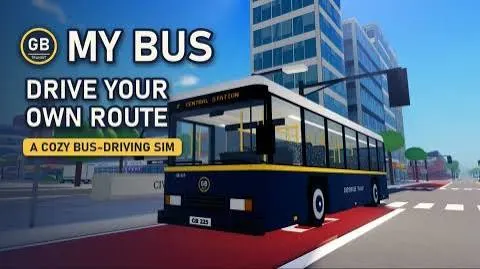
Welcome to My Bus, where you become a city bus driver in the strange town of Graybridge. Your responsibility is to transport passengers, collect fares, follow assigned schedules, and keep your routes running smoothly. However, the town has an unusual atmosphere, so staying alert is just as important as driving carefully.
The game features seven different routes, each offering opportunities to earn S Points and improve your driving skills. Completing routes helps you make progress and unlock additional vehicles and upgrades.
As you advance, you can purchase new buses and improve essential components such as the engine, brakes, and doors. You can also customize your vehicles to create a driving setup that matches your preferences.
My Bus Script 2026
My Bus Script Bus Hub | Bus Boost, Overspeed Push and More
loadstring(game:HttpGet("https://raw.githubusercontent.com/NewTabGames/Bus-Hub/refs/heads/main/BusHub.lua"))()Also check : Urban Reload Script
What Is My Bus Script?
My Bus Script is an unofficial third-party Roblox tool designed to modify selected vehicle performance settings in My Bus. Its main focus is driving customization, acceleration, maximum speed, and braking behavior.
The script includes options such as Bus Boost and Overspeed Push, along with adjustable Speed and Brake Multipliers. These features are intended to provide additional control over how the vehicle accelerates, travels, and slows down.
Unlike scripts that focus on farming or combat automation, My Bus Script concentrates primarily on vehicle-related settings. Its advertised functions are intended to let players experiment with different driving behaviors and customize their buses.
The exact functionality depends on the script version and compatibility with the current game. Unauthorized modifications may also violate Roblox’s rules and introduce account or security risks.
My Bus Script Features
The following sections explain the advertised features and their intended purposes.
1. Bus Boost
Bus Boost is designed to provide an additional performance boost to the vehicle. It is intended to improve the bus’s driving behavior and make acceleration more convenient during different routes.
Its actual effect depends on the script’s implementation and the game’s vehicle physics.
2. Overspeed Push
Overspeed Push is an advertised feature associated with increasing or pushing the vehicle’s speed beyond its normal behavior.
This option is intended for players who want to experiment with faster driving performance. Its effectiveness and limitations depend on the script version and the game’s mechanics.
3. Speed Multiplier
Speed Multiplier provides a setting for adjusting the vehicle’s speed behavior. It is designed to give players additional control over how quickly their bus travels.
The available values and their effects depend on the implementation.
4. Brake Multiplier
Brake Multiplier is intended to adjust the braking power of the vehicle. It provides an additional setting for changing how the bus slows down when braking.
This can be useful for players experimenting with different driving configurations, although the actual response depends on the game’s vehicle system.
How My Bus Script Improves Gameplay
Driving efficiently is an important part of My Bus. Players need to complete routes, collect fares, transport passengers, and manage their vehicles throughout their journeys.
The advertised script features focus on changing vehicle performance. Bus Boost and Overspeed Push are designed to provide additional acceleration and speed-related options, while Speed Multiplier offers further control over vehicle speed.
Brake Multiplier adds another customization option by adjusting braking behavior. Together, these settings are intended to give players more flexibility when experimenting with different driving setups.
However, these modifications may change the intended vehicle behavior and are not guaranteed to work with every bus or game update.
How to Use My Bus Script
The setup process can vary depending on the script version and the third-party software involved. Before using an unofficial tool, consider these precautions:
- Open Roblox and review the rules that apply to My Bus.
- Check the source of any third-party software before downloading it.
- Read the available documentation to understand the tool’s requirements and advertised features.
- Avoid suspicious downloads or programs that request unnecessary permissions.
- Never share your Roblox password, authentication cookies, or session tokens with third-party tools.
- Remember that unauthorized vehicle modifications may violate Roblox’s rules and could result in account restrictions.
Using the game’s built-in vehicle upgrades and driving controls is the safest way to enjoy My Bus without the additional risks associated with unofficial scripts.
Is My Bus Script Safe?
The safety of My Bus Script cannot be confirmed from its advertised features alone. Unverified scripts may contain malicious code, direct users to unsafe downloads, or expose sensitive account information.
There is also an account-related risk. Modifying vehicle speed, acceleration, or braking behavior through unauthorized tools may conflict with the game’s intended mechanics or Roblox’s rules.
To protect your account and device, avoid suspicious files, never share login credentials, and review Roblox’s current policies before using third-party software. No unofficial script should be considered completely safe or guaranteed to avoid account penalties.
Frequently Asked Questions
What Is My Bus Script?
My Bus Script is an unofficial Roblox tool advertised as providing additional vehicle performance settings, including acceleration boosts, speed adjustments, and braking customization.
What Does Bus Boost Do?
Bus Boost is intended to provide an additional performance boost to the bus. Its actual effect depends on the script’s implementation and the game’s vehicle mechanics.
What Is Overspeed Push?
Overspeed Push is designed to provide an additional speed-related modification, allowing players to experiment with faster vehicle performance.
What Does Speed Multiplier Do?
Speed Multiplier provides a setting for adjusting the bus’s speed behavior. The available values and actual effects depend on the script version.
What Is Brake Multiplier Used For?
Brake Multiplier is intended to adjust the vehicle’s braking power, providing additional control over how the bus slows down.
How Many Routes Are Available in My Bus?
According to the supplied game description, My Bus features seven different routes. Players can complete them to earn S Points and improve their driving skills.
Can I Unlock New Buses in My Bus?
Yes. The game description mentions unlocking new buses as you progress. Players can also upgrade components such as engines, brakes, and doors.
Can Using My Bus Script Get My Roblox Account Banned?
Yes. Using unauthorized scripts that violate Roblox’s rules may result in account restrictions or other penalties. Players should review the applicable policies before using third-party tools.
Conclusion
My Bus Script is advertised as a vehicle customization tool for the Roblox game My Bus. Its main features include Bus Boost, Overspeed Push, Speed Multiplier, and Brake Multiplier, offering additional options for adjusting vehicle performance.
These settings are intended to provide more control over acceleration, speed, and braking while driving through Graybridge and completing different routes. However, their effectiveness depends on the specific script version and the game’s current mechanics. Third-party scripts can also create security risks and put Roblox accounts at risk, so players should carefully consider these concerns before using unofficial tools.