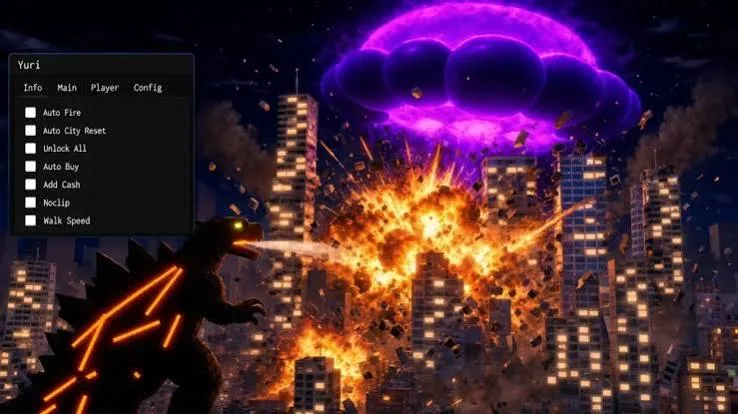
The Smash the City Script is a third-party Roblox script designed to provide additional controls for weapon usage, purchasing, movement, and city destruction. It includes features such as Auto Fire, weapon selection, Auto Buy, cooldown management, and city reset options.
The script also lists cash-related controls, including Cash Amount and Add Cash, along with an Unlock All option. Additional movement, camera, visual, and server utilities may provide more flexibility when navigating the game and managing different gameplay settings.
For players who enjoy experimenting with powerful weapons and causing large-scale destruction, these features focus on reducing repetitive actions and making certain in-game activities easier to manage. However, the availability and functionality of individual options depend on the specific script version.
Table of Contents
About Smash the City
Smash the City is a chaotic destruction simulator built around one simple idea: use powerful weapons and unusual abilities to demolish a city. Rather than focusing on traditional combat or completing a long series of missions, the game emphasizes destruction, experimentation, and the effects of different weapons on the surrounding environment.
Players can unleash devastating attacks using weapons and abilities such as explosive rockets, nuclear blasts, tornadoes, tsunamis, black holes, and orbital lasers. Each option offers a different way to damage buildings and transform the skyline into a landscape of rubble.
The appeal comes from experimenting with destructive tools and watching the environment change as attacks unfold. Players can try different weapons, explore the available mechanics, and discover how various abilities affect the city.
Smash the City Script 2026
Smash the City Script Barrage Hub
loadstring(game:HttpGet("https://barrage.cc/loader"))()Smash the City Script Yuri Hub
loadstring(game:HttpGet("https://raw.githubusercontent.com/iLove-yuri/leeeeesbian/refs/heads/main/homumado.lua"))()Also check: Sarab Script
What Is Smash the City Script?
Smash the City Script is a community-created modification intended to add extra controls and automate selected activities in the Roblox game. Depending on the release, it may offer options for firing weapons, purchasing equipment, managing cooldowns, resetting the city, and adjusting certain gameplay settings.
Some listed features also relate to cash and unlocking content. These options may alter the normal progression system, so their actual behavior should be checked against the specific version rather than assumed to work as advertised.
The script is not an official feature released by the game’s developers. Third-party scripts may stop working after updates, and using unauthorized modifications can violate Roblox’s rules or result in account restrictions.
Smash the City Script Features
The reported features cover weapon automation, purchasing, destruction controls, cash options, and gameplay utilities.
1. Auto Fire
Auto Fire is designed to automate weapon firing when supported by the selected weapon and script version. Instead of repeatedly activating the fire control manually, players may be able to let the feature handle the action.
Its effectiveness depends on the weapon’s mechanics, cooldowns, and the way the script interacts with the game.
2. Weapon Selection
The weapon selection feature provides an additional way to choose from available weapons. This may help players switch between different destructive tools without navigating the usual selection process each time.
The weapons accessible through this option depend on the game’s current content and the script’s implementation.
3. Auto Buy
Auto Buy is intended to automate selected purchasing actions. In a game where acquiring equipment is part of the progression system, this feature may reduce the number of manual interactions needed to obtain available items.
Purchasing behavior can depend on available cash, item requirements, and the current game version.
4. Cooldown Management
Cooldown management options are designed to provide additional control over actions that have waiting periods. Depending on the implementation, these settings may help players monitor or adjust certain cooldown-related behaviors.
Not every cooldown can necessarily be changed, and the feature may not work consistently after game updates.
5. City Reset
The city reset option is intended to provide a convenient way to reset the destruction environment. This can be useful for players who want to begin another round of destruction without manually repeating the entire setup process.
The exact effect depends on how the game handles resets and whether the script supports the current version.
6. Cash Amount
Cash Amount is a listed cash-related control that may be used to manage or display an in-game cash value, depending on the implementation.
The feature’s precise behavior should not be assumed without documentation from the relevant script version.
7. Add Cash
Add Cash is another reported feature associated with in-game currency. It is intended to provide an additional way to interact with the game’s cash system.
Whether it changes a displayed value or affects actual server-side currency depends on the script’s implementation and the game’s validation systems. A feature name alone does not guarantee that currency will be added successfully.
8. Unlock All
Unlock All is designed to provide access to available content or options that may otherwise require progression. Its actual scope can vary, and it should not be assumed to unlock every item or weapon in every version of the game.
9. Movement Options
Additional movement utilities may provide more control over how the player travels around the environment. The exact settings available depend on the particular release.
10. Camera Controls
Camera-related options are intended to change how players view the city and observe destruction. Such controls may be useful when exploring different angles or following the effects of powerful attacks.
11. Visual Options
Visual utilities may provide additional ways to adjust or inspect aspects of the game environment. Available options depend on the script’s interface and implementation.
12. Server Utilities
The script also lists server-related utilities. These may offer extra controls for managing certain aspects of a session, although their precise functions should be confirmed from the relevant documentation.
How to Use Smash the City Script
The setup process depends on the source of the script and the tools it requires. Before running any third-party code, review its contents and consider the risks associated with unauthorized modifications.
- Open Roblox and locate Smash the City.
- Review the game’s rules and the policies that apply to third-party scripts.
- Check the script’s source and documentation to understand which features it provides.
- Avoid running unknown code that requests your Roblox password, session cookies, or authentication tokens.
- If you encounter compatibility issues, avoid downloading unofficial fixes or disabling your device’s security protections.
For a safer experience, use the game’s built-in weapon selection, purchasing system, and destruction mechanics.
Benefits of Smash the City Script
The script’s reported features focus on reducing repetitive actions and providing extra control over several gameplay systems.
Simplified Weapon Usage
Auto Fire and weapon selection are designed to make certain weapon-related actions easier to manage. Their usefulness depends on the selected equipment and the script’s compatibility with the game.
Convenient Purchasing
Auto Buy may reduce the need to repeat purchasing interactions when obtaining available equipment. Normal currency requirements and item restrictions may still apply.
More Control Over Destruction
Cooldown management and city reset options are intended to help players manage repeated destruction activities and start fresh when needed.
Additional Gameplay Settings
Movement, camera, visual, and server utilities may offer further customization. The available controls vary by release, so check the actual feature list before relying on a specific option.
Is Smash the City Script Safe?
Third-party Roblox scripts should be approached with caution. A script may contain unexpected code, and the executor or download source used to run it may introduce additional security risks.
Never share your Roblox password, session cookies, authentication tokens, or other sensitive account information. Avoid downloads that require you to disable security software or install unrelated applications.
Using unauthorized scripts may also violate Roblox’s rules or the game’s policies, potentially resulting in account restrictions. No third-party script can be guaranteed to work safely or remain compatible with every update.
Frequently Asked Questions
What is Smash the City Script?
Smash the City Script is a third-party modification designed to add extra controls and automation options to the Roblox destruction simulator Smash the City.
Which features does the script include?
The reported features include Auto Fire, weapon selection, Auto Buy, cooldown management, city reset controls, Cash Amount, Add Cash, Unlock All, and additional movement, camera, visual, and server utilities.
Does Auto Fire work with every weapon?
Universal weapon compatibility has not been confirmed. Its behavior depends on the weapon’s mechanics, the script version, and the current game update.
Can the script add cash to my account?
The script lists Cash Amount and Add Cash features, but their actual effects have not been independently verified. A feature’s name does not guarantee that it can modify server-controlled currency.
What does Unlock All do?
Unlock All is intended to provide access to certain content or options. The exact items affected depend on the script’s implementation and the game’s current systems.
Does the script work on mobile and PC?
Compatibility with every device has not been confirmed. Support depends on the script, the tools required to run it, and changes to Roblox and Smash the City.
Can using Smash the City Script get me banned?
Yes, using unauthorized scripts may violate Roblox’s rules and lead to account restrictions. There is no guarantee that a third-party script is free from enforcement risks.
Conclusion
The Smash the City Script is designed to provide additional controls for weapon usage, purchasing, and large-scale destruction in Roblox. Its reported features include Auto Fire, weapon selection, Auto Buy, cooldown management, city resets, Cash Amount, Add Cash, and Unlock All.
Additional movement, camera, visual, and server utilities may provide further customization, depending on the version. However, the actual functionality of these options can vary, and third-party scripts carry security and account risks. Review the available documentation and consider the game’s rules before using unauthorized modifications.