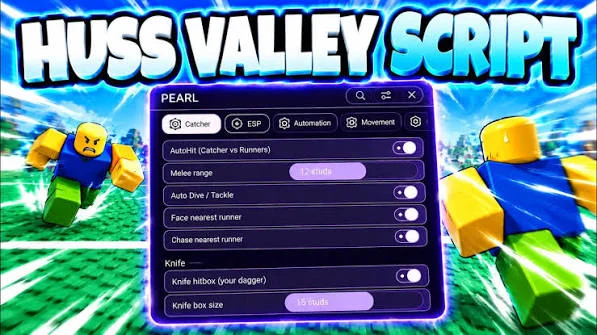
Huss Valley Script is a third-party Roblox automation script designed to simplify repetitive activities in Huss Valley. Depending on the version, it may offer features for automatic dodging, catching opponents, melee attacks, reviving teammates, collecting gems, managing clones, and navigating routes.
The script focuses on automating parts of the game’s fast-paced Tag-style matches. Additional options may help with entering matches, selecting characters, adjusting safe-zone behavior, and reducing interruptions caused by popups.
Since Huss Valley relies on movement, timing, and survival, these automation features are designed to handle certain repetitive actions with less manual input. However, available functions and compatibility can vary between script releases.
Table of Contents
About Huss Valley
Huss Valley is a Roblox game inspired by the classic game of Tag. It combines fast movement, parkour, dodging, and survival challenges to create competitive matches where players must react quickly to their opponents.
Each round features a Chaser and a group of Runners. The Chaser attempts to catch the other players, while the Runners try to avoid being tagged and survive by moving through the arena.
Players need to use their surroundings, choose suitable routes, and time their movements carefully. Quick direction changes and clever movement can help Runners escape, while Chasers must anticipate their opponents and close the distance.
Huss Valley Script 2026
Huss Valley Script ThumbsHub Keyless
loadstring(game:HttpGet("https://api.luarmor.net/files/v4/loaders/7a310d875453e7adb4fe6046e3ab0af9.lua"))()Huss Valley Script PEARL Hub
loadstring(game:HttpGet("https://api.jnkie.com/api/v1/luascripts/public/e71fe8b37324749a6ef1225fd7da8580ae6c11a093013353a3db81f450235b5c/download"))()Huss Valley Script Valex Hub
loadstring(game:HttpGet("https://gist.githubusercontent.com/nickhert/0532627689b95c11c69fc8e41209dff0/raw/63009963e15d3bf5a51080cc3970b0ee7cf5baf0/Valex.lua"))()Huss Valley Script GUI
loadstring(game:HttpGet("https://pastefy.app/ULaWpxKm/raw"))()Huss Valley Script Sottoro Hub
loadstring(game:HttpGet("https://api.luarmor.net/files/v4/loaders/d792d2a2b58c6e3335851d13b4f4f3a3.lua"))()Also check: Murder Mystery 2 Script
What Is Huss Valley Script?
Huss Valley Script is a third-party script designed to provide additional automation options for Huss Valley.
Depending on the current release, the script may include functions for dodging, catching, attacking, reviving, collecting gems, managing clones, and navigating the map.
Some versions may also include match-entry automation and character selection options. A graphical interface, when available, can make these settings easier to access and manage.
Because third-party scripts depend on the game’s mechanics, some functions may stop working after Huss Valley or Roblox receives an update.
Huss Valley Script Features
Auto Dodge
Auto Dodge is designed to automate evasive movement when opponents approach. Some versions may include configurable safe-zone behavior to determine how the function responds to different situations.
Dodging is important in Huss Valley because Runners need to avoid the Chaser while navigating the arena.
Safe-Zone Settings
Safe-zone settings provide additional control over how automatic dodging behaves around designated areas.
The available options depend on the script version and the way safe zones work in the current game.
Auto Catch
Auto Catch is designed to automate catching actions when the player has the appropriate role and the required conditions are met.
This feature is intended to reduce repeated manual input during matches where catching opponents is the main objective.
Auto Melee
Some versions include automatic melee attacks. This function is designed to trigger supported close-range attacks without requiring every action to be performed manually.
Its behavior depends on the game’s combat mechanics and the current script implementation.
Auto Revive
Auto Revive is designed to automate revival actions when the game allows a player or teammate to be revived.
The availability of this feature depends on whether the current version of Huss Valley includes compatible revival mechanics.
Clone Management
Some script versions offer options for managing clones or clone-related abilities.
The exact behavior depends on the game’s mechanics and the features implemented in the script.
Auto Collect Gems
Auto Collect Gems is designed to automate the collection of available gems around the map.
Collecting resources can be a repetitive activity, especially when players need to move between different areas. Automation may reduce the amount of manual work involved.
Smart Route Navigation
Smart Route Navigation is intended to help automate movement along selected or suitable routes.
Depending on the implementation, it may help the character move through the arena while accounting for the game’s navigation requirements.
The effectiveness of route navigation can vary with map layouts, obstacles, and game updates.
Auto Match Entry
Auto Match Entry is designed to automate joining available matches. Instead of repeatedly interacting with matchmaking options, the script may handle supported entry actions automatically.
Auto Character Selection
Some versions include character selection automation. This feature is intended to select a supported character without requiring repeated manual interaction.
Available choices depend on the game’s current character system and the script version.
Popup Handling
Popup handling is designed to reduce interruptions from supported in-game popups.
The exact behavior depends on which interface elements the script can recognize and interact with.
How to Use Huss Valley Script
The exact setup depends on the script and the third-party executor required by its current release. A general process may include the following steps:
- Open Roblox and sign in to your account.
- Launch Huss Valley.
- Check whether the script is compatible with the current game version.
- Obtain the script from a source you trust.
- Review the script code and understand the risks before running it.
- If using an appropriate development or testing environment, follow its documented setup instructions.
- Review the available settings and check what each function does.
- Configure the available options according to your preferences.
- Monitor the game to make sure the selected functions behave as expected.
Never provide your Roblox password, authentication cookies, session tokens, or other sensitive account information to a third-party script or executor.
Understanding Huss Valley Gameplay
Huss Valley combines fast movement with the familiar rules of Tag. The roles of Chaser and Runner create different objectives during each round.
Playing as a Runner
Runners need to avoid the Chaser and survive for as long as possible. Movement, route selection, and quick reactions are important because the Chaser may attempt to cut off escape routes.
Useful skills include:
- Changing direction quickly
- Using parkour routes
- Watching the Chaser’s position
- Avoiding predictable movement
- Understanding the arena layout
- Choosing escape routes carefully
Playing as the Chaser
The Chaser must locate and catch the Runners. Instead of simply following the closest player, successful chasing often requires anticipating movement and choosing routes that reduce escape opportunities.
Players can improve by observing their opponents, learning the map, and reacting quickly to changes in direction.
Why Use Huss Valley Script?
Huss Valley matches can involve repeated movement, dodging, catching, and collecting activities. These actions may become repetitive during longer play sessions.
Automation features are designed to reduce some of this manual input. Options for match entry, character selection, route navigation, and gem collection may also simplify routine interactions.
However, using third-party automation can change the intended gameplay experience and may provide an unfair advantage over other players.
Huss Valley Script Compatibility
Third-party scripts can become outdated when Roblox or Huss Valley receives an update. Changes to movement, character abilities, map layouts, match systems, or interface elements may affect individual functions.
Before using a script, check:
- Current Roblox version
- Current Huss Valley version
- Script update status
- Executor compatibility
- Device support
- Individual feature compatibility
A script may load successfully even when some of its functions no longer work correctly.
Common Huss Valley Script Problems
Auto Dodge Does Not Work
The script may be outdated, or the current movement mechanics may differ from the version it was designed for. Safe-zone settings may also affect how the feature behaves.
Auto Catch Fails
Catching mechanics may have changed, or the feature may require a specific role or situation to function.
Gems Are Not Collected
The script may not recognize the current resource system or the locations of available gems.
Route Navigation Gets Stuck
Obstacles, map changes, and movement mechanics can affect automated navigation. Some routes may no longer be compatible with an older script.
Character Selection Does Not Work
Changes to the character menu or selection interface can prevent older automation functions from responding correctly.
Is Huss Valley Script Safe?
Third-party Roblox scripts should always be treated with caution. A script described as verified or working does not automatically guarantee that it is secure.
Unknown code may contain unwanted behavior, and unauthorized automation can violate Roblox’s rules and potentially result in account restrictions.
Before running third-party code, consider its source and avoid sharing sensitive account information. Never provide your Roblox password, cookies, authentication tokens, or other private credentials to a script provider or executor.
Does Huss Valley Script Require a Key?
Key requirements depend on the specific script release. Some versions may be keyless, while others may require users to complete a verification process.
Always check the requirements of the current release rather than assuming every Huss Valley script uses the same system.
Does Huss Valley Script Work on Mobile?
Mobile compatibility depends on the script and executor. Some third-party executors support mobile devices, while others are designed primarily for PC.
A script that works on Windows is not automatically guaranteed to work on Android or other mobile platforms. Check compatibility with your device and Roblox version before using it.
Frequently Asked Questions
What is Huss Valley Script?
Huss Valley Script is a third-party Roblox script designed to automate selected activities in Huss Valley. Depending on the version, it may include Auto Dodge, Auto Catch, Auto Melee, Auto Revive, Auto Collect Gems, route navigation, and character selection.
What does Auto Dodge do?
Auto Dodge is designed to automate evasive movement when opponents approach. Some versions may provide additional safe-zone settings.
Can Huss Valley Script collect gems automatically?
Some releases include Auto Collect Gems, which is designed to automate the collection of supported in-game resources.
Does the script support route navigation?
Certain versions advertise Smart Route Navigation to help automate movement through the arena. Its performance depends on the current map and movement mechanics.
Can the script automatically join matches?
Some releases include Auto Match Entry, which is designed to automate supported matchmaking interactions.
Does Huss Valley Script include Auto Revive?
Some versions advertise an Auto Revive function. Whether it works depends on the game’s revival mechanics and the particular script release.
Why did Huss Valley Script stop working?
The game or Roblox may have received an update that changed systems the script depends on. An outdated script or incompatible executor can also cause individual features to fail.
Can using Huss Valley Script get my account banned?
Unauthorized third-party scripts may violate Roblox’s rules and carry a risk of account restrictions. No script can guarantee that an account will never be penalized.
Conclusion
Huss Valley Script is designed to automate repetitive activities in the Roblox Tag-style game. Depending on the current release, its features may include Auto Dodge, Auto Catch, Auto Melee, Auto Revive, clone management, gem collection, route navigation, automatic match entry, and character selection.
These options aim to simplify certain gameplay tasks and reduce repeated manual interactions. However, third-party scripts may become incompatible after game updates and can carry security or account risks.
Always verify compatibility, use caution with external code, and protect your Roblox account information when dealing with third-party scripts or executors.