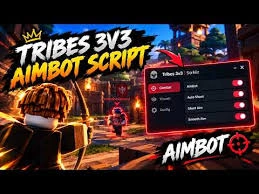
Tribes 3v3 Script is a third-party tool designed for players looking for additional customization options related to aiming, combat, movement, weapon actions, and visual settings in the Roblox game Tribes 3v3. Its described features include enemy ESP, aim assistance, automated weapon actions, healing controls, movement adjustments, and configuration management.
Tribes 3v3 is a competitive team-based first-person shooter where coordination, accurate aiming, and quick decisions can influence the outcome of every match. Two teams of three players compete to capture the opposing team’s flag and return it to their own base while defending their flag from enemy players.
The script brings together several categories of gameplay modifications in one interface. Players can configure targeting options, adjust supported combat settings, customize movement, and save preferred configurations for later sessions. However, some features may provide an unfair advantage over other players and may violate the game’s rules. Compatibility and functionality can also change when the game is updated.
Table of Contents
What Is Tribes 3v3?
Tribes 3v3 is a team-based first-person shooter built around objective-focused combat. Each team consists of three players, and the main objective is to capture the enemy flag and return it to your own base.
Winning requires more than simply eliminating opponents. Players must work together, defend their flag, coordinate attacks, and recognize opportunities to move toward the enemy base. Good positioning and effective use of weapons can make a significant difference during a match.
Because the game combines combat with objective-based gameplay, players need to balance attacking and defending. A player who focuses entirely on combat may overlook an opportunity to capture the flag, while a team that ignores defense may allow opponents to score easily.
The variety of weapons, movement options, and tactical decisions gives players different ways to approach each match. Tribes 3v3 Script is designed to modify selected aspects of this experience through additional controls and automation.
Tribes 3v3 Script 2026
Tribes 3v3 Script JN Hub
loadstring(game:HttpGet("https://raw.githubusercontent.com/JNHHGaming/Patchedscript/refs/heads/main/JN%20HH%20Gaming",true))()Tribes 3v3 Script MunkeHub No Key
loadstring(game:HttpGet("https://pastefy.app/rha3AQFZ/raw", true))()Tribes 3v3 Script MunkeHub No Key
loadstring(game:HttpGet("https://gist.githubusercontent.com/user2084375/ef0c1434dc71b6bec4349ee57b04f1b5/raw/66f8d272ceecb1117226b0c7fd72a5850403399f/gistfile1.txt"))()Also check: Bike For Egg Script
What Is Tribes 3v3 Script?
Tribes 3v3 Script is a third-party script that aims to modify or automate certain gameplay activities. Its described functions cover several areas, including aiming assistance, enemy detection, weapon automation, healing, melee combat, movement, and visual adjustments.
The script also includes configuration management features. These options are intended to let players save their preferred settings and load them again during later sessions.
Depending on the version, the interface may allow players to adjust targeting field of view, configure a healing threshold, change melee distance, or enable particular movement features. Not every option is guaranteed to work with every game update.
It is important to understand that third-party scripts are not necessarily supported by the game developer. Automated combat actions, enemy ESP, and aiming modifications may violate the game’s rules or trigger anti-cheat enforcement.
Tribes 3v3 Script Features
The available feature list covers aiming, weapon automation, healing, movement, configuration, and visual settings. Here is an overview of the described options.
1. Aiming and Enemy Detection
Aiming and enemy detection features focus on targeting opponents and improving awareness during combat. These options may change how players identify or aim at enemies compared with the standard gameplay experience.
Headshot Aim
Headshot Aim is described as a targeting feature that focuses on enemy head hitboxes. In games where headshots deal additional damage, targeting the head can influence how quickly an opponent is eliminated.
The actual behavior depends on the script’s implementation and the game’s hit detection system. Automated targeting may also provide an unfair competitive advantage and carry a risk of account penalties.
Fast Aim
Fast Aim is intended to provide a faster aiming option. Its purpose is to modify the speed or behavior of supported aiming assistance.
The exact effect can vary by version, and the feature should not be assumed to guarantee accurate shots or better results in every encounter.
Aim FOV
Aim FOV refers to the field of view used by an aiming-assistance feature. Depending on the implementation, this setting determines how wide an area the feature considers when identifying potential targets.
A narrower field may focus on a smaller area, while a wider field may consider more of the surrounding screen. The available adjustment range depends on the script version.
Enemy ESP
Enemy ESP is a visual detection feature intended to make opposing players easier to locate. It may display additional information about enemies who would otherwise be difficult to notice.
In a competitive shooter, knowing an opponent’s location can affect decisions about attacking, defending, and moving toward the flag. However, enemy ESP can undermine fair play and may violate the game’s rules.
2. Weapon Automation
Weapon automation features are designed to automate selected actions associated with supported weapons and equipment. The listed options cover the Crossbow, Flintlock, Slingshot, throwing knives, and smoke bombs.
Auto Crossbow
Auto Crossbow is intended to automate supported actions involving the Crossbow. The feature may reduce manual input associated with using this weapon, depending on how it is implemented.
Its actual behavior and compatibility depend on the current game mechanics and script version.
Auto Flintlock
Auto Flintlock focuses on automating supported Flintlock-related actions. It is intended for players using the Flintlock as part of their preferred combat setup.
The feature’s functionality may vary, and it does not guarantee successful hits or improved performance.
Auto Slingshot
Auto Slingshot is described as an automation option for Slingshot-related actions. It aims to reduce the manual input required for supported weapon interactions.
The specific actions it can perform depend on the implementation and the game’s current weapon mechanics.
Auto Throwing Knife
Auto Throwing Knife is intended to automate selected throwing knife actions. This may change how the script handles the weapon during combat.
As with other weapon automation features, the available behavior depends on the version and may not remain compatible following a game update.
Full Draw Only
Full Draw Only is intended to restrict supported weapon actions to fully drawn shots. For weapons that use a draw or charge mechanic, this setting may help determine when an action is performed.
Its availability and effect depend on the supported weapons and how the script handles their firing mechanics.
Auto Smoke Bomb
Auto Smoke Bomb is designed to automate supported smoke bomb actions. Smoke bombs can serve a tactical purpose by affecting visibility, depending on the game’s mechanics.
The script’s exact activation behavior is implementation-dependent, and automated equipment use may not always respond as expected.
3. Combat and Healing
Combat and healing features focus on health management and close-range encounters. These options are intended to modify selected combat interactions.
Auto Heal
Auto Heal is designed to automate supported healing actions. Managing health is important in team-based shooters because remaining alive can help a player continue defending or pursuing an objective.
An automated healing function may reduce the need for manual input, but its effectiveness depends on the game’s healing mechanics and the script’s implementation.
Heal Below
Heal Below is a configurable health threshold associated with the healing feature. It is intended to determine the health level at which healing automation should activate.
For example, a player might want healing to be considered only after health drops below a selected value. The available range and exact behavior depend on the version.
Smart Melee
Smart Melee is described as a feature that assists with melee combat. It may modify or automate selected aspects of close-range interactions.
The specific assistance provided is not guaranteed and depends on how the script is implemented. Automated combat actions may also conflict with the game’s rules.
Melee Distance
Melee Distance is a setting associated with the distance used for melee actions. It is intended to provide control over how the melee feature evaluates nearby opponents.
The permitted values and actual effect depend on the script and the game’s combat system.
4. Movement Features
Movement can be an important part of Tribes 3v3 because players must travel between bases, protect their flag, and respond quickly to opposing players. The script includes several options intended to modify movement behavior.
Speed
Speed is designed to adjust the player’s movement speed. Depending on the implementation, it may allow movement behavior to differ from the game’s standard settings.
Unusual movement speeds can interfere with normal gameplay and may be detected by anti-cheat systems.
Speed Boost
Speed Boost is another movement-related option intended to provide an increase in movement speed. Its exact effect may differ from the standard Speed setting, depending on how the feature is implemented.
The two options should not be assumed to work independently or provide specific speed increases unless the script documentation confirms those details.
Smart Slide
Smart Slide is described as a feature that assists with sliding movement. If sliding is part of the game’s movement mechanics, this option may modify selected aspects of that action.
Its behavior depends on the game’s controls and the script version.
Jump Boost
Jump Boost is intended to increase jumping capability. This may affect how the player moves around the map or interacts with obstacles.
The actual effect is implementation-dependent, and movement modifications can create compatibility issues or violate gameplay rules.
5. Configuration Management
Configuration options help players preserve and reuse selected settings. These features are separate from aiming and combat functions, but they can make a script’s interface easier to manage.
Load Config
Load Config is designed to load a previously saved configuration. A configuration may contain supported settings related to aiming, movement, visuals, or other available features.
The settings that can be restored depend on what the script stores in its configuration file.
Save Config
Save Config is intended to save the current configuration. This allows supported settings to be reused instead of being selected again every time.
The feature’s behavior depends on the script’s configuration system and whether it successfully saves the selected options.
Auto Execute Config
Auto Execute Config is described as an option for automatically applying or executing a selected configuration. Its purpose is to reduce repeated setup work when starting a session.
The exact process depends on the implementation. Players should review what the configuration contains before allowing it to run automatically.
6. Visual Settings
Fullbright
Fullbright is a visual option intended to increase visibility in darker areas. Depending on the implementation, it may adjust lighting or brightness-related settings.
Improved visibility can make environmental details easier to see, but the result depends on the game’s lighting system and the script’s behavior.
How Configuration Features Can Help
Configuration management can be useful when a script offers many settings. Saving and loading supported options may reduce the need to configure every feature individually.
For example, a configuration may preserve selected visual settings or other preferences supported by the script. Automatic configuration execution may further reduce setup time, although its exact behavior depends on the implementation.
Before relying on configuration features, remember that saved settings may become incompatible after an update. It is also important to avoid loading configuration files from untrusted sources because they may contain unexpected settings or data.
Tips for Playing Tribes 3v3
Players can improve their experience without relying on unauthorized scripts by focusing on the game’s core mechanics.
Communicate With Teammates
Coordinate attacks and defense with your two teammates. Clear communication helps the team respond to enemy movements and organize flag captures.
Balance Offense and Defense
Avoid focusing exclusively on eliminating opponents. Protecting your own flag is just as important as reaching the enemy base.
Learn the Weapons
Spend time understanding the standard behavior, timing, and limitations of each weapon. Knowing when to use a particular weapon can improve decision-making during combat.
Practice Movement
Learn how the game’s standard movement mechanics work. Effective positioning and movement can help you avoid unnecessary engagements and respond to changing situations.
Understand the Objective
Remember that capturing the flag is central to the match. Eliminating opponents can create opportunities, but the team must still complete the objective to secure a successful result.
How to Use Tribes 3v3 Script
Third-party script usage varies by version and execution tool. Before running external code, review its source, compatibility information, and potential consequences.
- Open Roblox and launch Tribes 3v3.
- Familiarize yourself with the standard controls and match objectives.
- Review the script’s source and determine whether it comes from a trustworthy provider.
- Check compatibility information for the specific version and tool.
- Read the available feature descriptions so you understand what the script is designed to change.
- Review configuration files before loading them, especially if they come from another person or website.
- Stop using the script if it causes unexpected behavior or requests unrelated access to your device or account.
Using unauthorized scripts may violate Roblox’s rules and can result in account restrictions. Avoid unknown downloads, never share your Roblox password or session cookies, and do not disable security protections simply to run a third-party tool.
Is Tribes 3v3 Script Safe?
The safety of a third-party script depends on its code, source, and behavior. A feature list alone cannot establish whether a tool is trustworthy.
Scripts that modify aiming, reveal enemy positions, automate weapon actions, or change movement may also create a competitive advantage that violates the game’s rules. As a result, using them can carry both security risks and the possibility of account penalties.
Consider the following precautions:
- Avoid suspicious downloads and websites that make unrealistic promises.
- Never provide your Roblox password, session cookies, or authentication tokens to a script provider.
- Do not disable antivirus or other security protections to run unfamiliar software.
- Treat claims of guaranteed safety or ban-free operation with skepticism.
- Stop using a tool if it behaves differently from its description.
- Consider using the game’s standard settings and controls instead.
No third-party script can guarantee account safety or continued compatibility with future game updates.
Frequently Asked Questions
What Is Tribes 3v3 Script?
Tribes 3v3 Script is a third-party tool described as offering aiming assistance, enemy detection, weapon automation, healing options, movement modifications, configuration management, and visual settings for Tribes 3v3.
What Does Enemy ESP Do?
Enemy ESP is intended to make opposing players easier to locate by displaying additional visual information. Such features may violate the game’s rules and can provide an unfair advantage.
Does Tribes 3v3 Script Include Auto Heal?
Yes, Auto Heal is included in the described feature list. The script also lists Heal Below, which is intended to configure the health threshold associated with healing automation.
Which Weapons Are Supported?
The listed weapon automation features include Auto Crossbow, Auto Flintlock, Auto Slingshot, Auto Throwing Knife, and Auto Smoke Bomb. Full Draw Only is also listed as an option for supported weapon actions.
Can I Save My Settings?
The described configuration features include Load Config, Save Config, and Auto Execute Config. Their behavior depends on the specific script version and its configuration system.
Does Fullbright Improve Visibility?
Fullbright is intended to improve visibility in darker areas by modifying brightness or lighting-related behavior. The actual effect depends on the game and the script’s implementation.
Does Tribes 3v3 Script Work on Every Device?
Universal compatibility cannot be guaranteed. Support depends on the script version, the execution tool, the device, and changes to Roblox or Tribes 3v3.
Can Using Tribes 3v3 Script Get Me Banned?
Yes. Unauthorized scripts may violate Roblox’s rules and can lead to account restrictions or other penalties. No third-party tool can guarantee that an account will remain free from enforcement action.
Conclusion
Tribes 3v3 Script is described as a collection of tools for modifying aiming, enemy detection, weapon actions, healing, movement, configuration management, and visual settings. Features such as Aim FOV, Enemy ESP, Auto Heal, Smart Melee, Speed Boost, and Fullbright cover several aspects of the game’s competitive experience.
Configuration options may also help preserve supported preferences between sessions. However, actual functionality and compatibility depend on the specific version, and not every advertised feature is guaranteed to work.
Because combat automation, enemy detection, and movement modifications can violate game rules, players should carefully consider the consequences before using third-party scripts. Learning the standard controls, coordinating with teammates, and practicing objective-based strategies remain reliable ways to develop skills in Tribes 3v3.