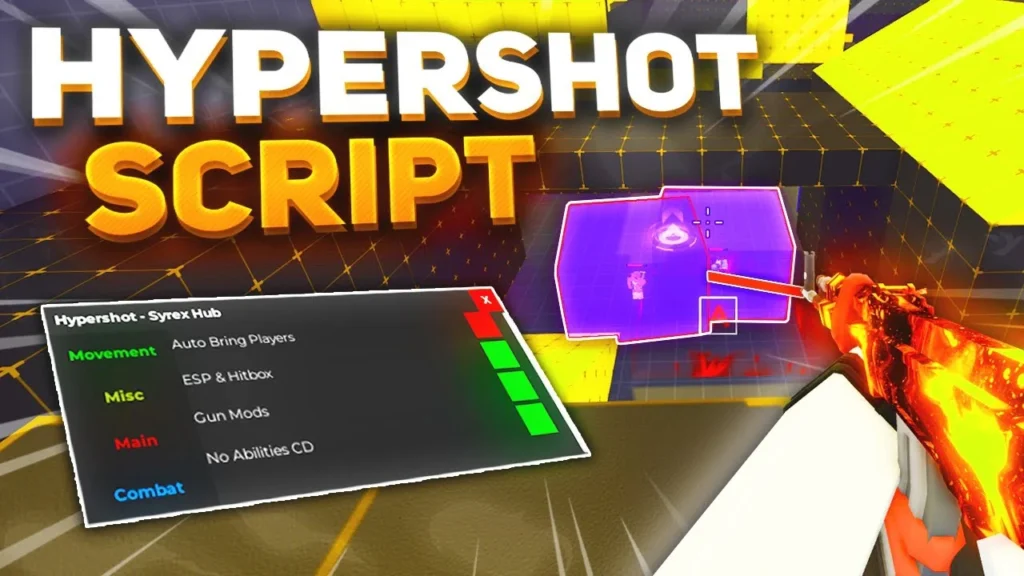
Hypershot Script is a collection of Roblox scripts designed to add automation and customization options to the popular shooter game Hypershot. Depending on the script version, players may find features such as Aimbot, ESP, Hitbox adjustments, FOV controls, crosshair customization, movement enhancements, and other gameplay options.
The scripts are generally presented through simple graphical interfaces, making it easier to locate and configure individual settings. Players can enable or disable features according to their preferences instead of manually changing complicated options.
Because Hypershot and Roblox can receive updates that affect how third-party scripts function, compatibility may change over time. A feature that works today may stop working after a game update, so users should always check whether they are using a current version.
What Is Hypershot Script?
Hypershot Script refers to third-party Lua-based scripts created for use with the Roblox game Hypershot. These scripts can modify or automate selected gameplay functions when executed through a compatible third-party executor.
The available functions can vary between script releases. Common options include aiming assistance, player ESP, hitbox settings, FOV adjustments, movement controls, and crosshair customization.
The main purpose of these scripts is to give players additional controls through a custom GUI. Instead of entering separate commands, users can typically select an option from the interface and adjust its settings.
Hypershot Script 2026 Copy
Slient Aim, ESP, FOV and More
loadstring(game:HttpGet("https://raw.githubusercontent.com/TheRealAvrwm/Zephyr-V2/refs/heads/main/Hypershot.lua", true))()Aimbot, ESP, Wallhack, Kill Aura
loadstring(game:HttpGet("https://pastebin.com/raw/RZK9XdtH"))()ESP Bots, Players, Aimbot Bots Or Players
loadstring(game:HttpGet("https://raw.githubusercontent.com/Kenniel123/HyperShot/refs/heads/main/Legit%20HyperShot"))()LegitBot, RageBot, ESP, Aimbot and More
loadstring(game:HttpGet("https://raw.githubusercontent.com/blackowl1231/Z3US/refs/heads/main/main.lua"))()Super Aimbot, ESP, Fun
loadstring(game:HttpGet("https://raw.githubusercontent.com/FeykHere/FeykhubOrignal/refs/heads/main/Feykhubloader"))()Aimbot, Hitbox Expander, ESP, Inf Ammo
local key = 'scriptkey'

shared = shared or {}
shared.__KEY_INPUT = key

loadstring(game:HttpGet("https://raw.githubusercontent.com/n1hitt/haunt.lol/refs/heads/main/rewind"))()
Silent Aim
local Players = game:GetService("Players")
local LocalPlayer = Players.LocalPlayer
local Camera = workspace.CurrentCamera
local Mouse = LocalPlayer:GetMouse()
local WorldToScreenPoint = Camera.WorldToScreenPoint
local GetPlayers = Players.GetPlayers
local FindFirstChild = game.FindFirstChild
local function GetOnScreenPosition(V3)
    local Position, IsVisible = WorldToScreenPoint(Camera, V3)
    return Vector2.new(Position.X, Position.Y), IsVisible
end
local function GetDirection(Origin, Position)
    return (Position - Origin).Unit * (Origin - Position).Magnitude
end
local function GetMousePosition()
    return Vector2.new(Mouse.X, Mouse.Y)
end
local function GetClosestPlayer()
    local Closest, Distance = nil, 10000
    for _, Player in next, GetPlayers(Players) do
        if Player ~= LocalPlayer then
            local Character = Player.Character
            local Head = Character and FindFirstChild(Character, "Head")
            local Humanoid = Character and FindFirstChild(Character, "Humanoid")
            if Head and (Humanoid and Humanoid.Health > 0) then
                local ScreenPos, IsVisible = GetOnScreenPosition(Head.Position)
                if IsVisible then
                    local _Distance = (GetMousePosition() - ScreenPos).Magnitude
                    if _Distance <= Distance then
                        Closest = Head
                        Distance = _Distance
                    end
                end
            end
        end
    end
    return Closest, Distance
end
local oldNamecall
oldNamecall =
    hookmetamethod(
    game,
    "__namecall",
    function(...)
        local Method = getnamecallmethod()
        local Arguments = {...}
        if Arguments[1] == workspace and Method == "Raycast" then
            if typeof(Arguments[#Arguments]) ~= "RaycastParams" then
                return oldNamecall(...)
            end
            local HitPart = GetClosestPlayer()
            if HitPart then
                Arguments[3] = GetDirection(Arguments[2], HitPart.Position)
                return oldNamecall(unpack(Arguments))
            end
        end
        return oldNamecall(...)
    end
)
Gun Mods, ESP, No Cooldowns
loadstring(game:HttpGet("https://pastebin.com/raw/RUjauPW6"))()Also Check: Volleyball Legends Script
Hypershot Script Features
Hypershot scripts can contain different features depending on the release. Some of the commonly advertised functions include the following.
Aimbot
Aimbot is designed to assist with aiming at opponents. Depending on the script, users may be able to adjust targeting behavior and other aiming-related settings.
The available controls can differ between versions, so not every release will provide the same options.
ESP Players
Player ESP can display information about other players while they are in the game. Depending on the implementation, this may help users identify opponents who are difficult to see during normal gameplay.
Some versions may include additional ESP settings for controlling which players or visual indicators are displayed.
Hitbox
Hitbox settings can modify how player hit areas are represented or handled by the script. This feature may include adjustable controls depending on the particular script release.
Because game updates can change character and combat mechanics, hitbox-related functions may be affected when Hypershot receives an update.
FOV Settings
FOV settings allow users to adjust the field of view used by the script. This can be useful for configuring aiming-related behavior and creating a preferred visual setup.
The available FOV controls depend on the individual script.
Crosshair Customization
Some Hypershot scripts include crosshair options that allow players to modify the appearance or behavior of the aiming indicator.
These settings can make the interface easier to customize according to personal preferences.
Speed
Movement-related settings may allow players to modify their movement speed. This can change how quickly a character moves around the map.
The exact behavior depends on the script and whether the feature remains compatible with the current version of Hypershot.
Super Jump
Super Jump is a movement option that can modify jumping behavior. When available, it may allow a character to jump higher than under the game’s standard settings.
Simple GUI
Many Hypershot scripts use a graphical user interface to organize their features. Instead of requiring users to remember multiple commands, the GUI can place settings into menus or toggles.
A simple interface can make it easier to find options such as ESP, Aimbot, FOV, Hitbox, and movement settings.
How to Use Hypershot Script
The exact process depends on the script and the executor being used. A typical setup follows these steps:
- Open Roblox and sign in to your account.
- Launch Hypershot.
- Use a compatible third-party script executor if required.
- Obtain the latest Hypershot Script from its source.
- Copy the script code.
- Paste the code into the executor.
- Execute the script while Hypershot is running.
- Wait for the script GUI to appear.
- Open the available settings.
- Enable the features you want to test.
- Adjust options such as FOV, ESP, Hitbox, or crosshair settings where available.
- Disable any function that causes problems or behaves unexpectedly.
Only use scripts from sources you trust. Never provide your Roblox password, authentication cookies, session tokens, or other private account information to a third-party script or executor.
Hypershot Script for Mobile
Some script executors support Roblox on mobile devices, while others are designed primarily for PC. As a result, mobile compatibility depends on both the executor and the particular Hypershot script.
Before attempting to use a script on Android or iOS, check whether the current executor supports your device and Roblox version. A script that works on PC may not necessarily function correctly on mobile.
Hypershot Script for PC
PC users generally have access to a wider range of third-party executor environments. However, compatibility still depends on the current Roblox version, executor, and script implementation.
If the script GUI does not appear or individual features fail, the issue may be caused by an outdated script or an incompatibility with the current game version.
Why Hypershot Scripts Stop Working
Third-party scripts can stop functioning for several reasons. Roblox updates can change internal systems that scripts depend on, while Hypershot updates can modify maps, characters, combat mechanics, or other game components.
Common causes include:
- The script has not been updated.
- The executor is incompatible with the current Roblox version.
- Hypershot changed its game mechanics.
- A particular feature was removed or changed.
- The script contains outdated functions.
- An error is preventing the GUI from loading correctly.
If only one feature stops working while the rest of the script remains functional, that particular function may need to be updated separately.
How to Fix Hypershot Script Issues
If a Hypershot script is not working properly, first restart Roblox and try again with the latest available version of the script.
You can also check whether the executor has received an update. If the GUI loads but a specific feature does not work, disable that feature and test the remaining options individually.
Avoid repeatedly executing an outdated script if it causes errors or unexpected behavior. Waiting for a compatible update may be necessary when Roblox or Hypershot has recently changed its systems.
Is Hypershot Script Safe?
Third-party Roblox scripts should be treated carefully because their source code and behavior can vary. An unfamiliar script may contain unwanted code, and using unauthorized automation can also violate Roblox’s rules and potentially result in account restrictions.
There is no universal guarantee that a script is safe simply because it is described as verified or working. Users should consider the source, inspect code when possible, and avoid sharing sensitive account information with third-party tools.
Does Hypershot Script Require a Key?
Key requirements depend on the individual script. Some releases may use a key system before allowing access to their features, while other versions may be available without one.
Always check the requirements of the specific version you are using rather than assuming that every Hypershot script has the same setup.
Hypershot Script Compatibility
Compatibility can change frequently. A script may work correctly on one version of Roblox and stop functioning after an update.
Before using a script, consider checking:
- Current Roblox version
- Current Hypershot version
- Executor compatibility
- Script update date
- Supported device
- Whether individual features are currently working
This can help identify whether a problem comes from the script, executor, game, or device.
Frequently Asked Questions
What is Hypershot Script?
Hypershot Script is a third-party Roblox script collection that can provide additional gameplay functions such as Aimbot, ESP, Hitbox settings, FOV controls, crosshair customization, speed, and jump options.
What features are available?
Features vary by script version, but commonly advertised options include Aimbot, ESP Players, Hitbox, FOV settings, crosshair controls, Speed, Super Jump, and a customizable GUI.
Does Hypershot Script work on mobile?
Some scripts may work on mobile through a compatible executor, but mobile support depends on the specific script and executor. PC and mobile compatibility should be checked separately.
Why is Hypershot Script not working?
The script may be outdated, the executor may not support the current Roblox version, or Hypershot may have changed something that affects the script.
Can I change the FOV?
If the current script includes FOV controls, you can adjust the available settings through its GUI. The exact controls depend on the script version.
Does every Hypershot script have Aimbot and ESP?
No. Features vary between scripts and releases. Check the feature list of the particular version before using it.
Can Hypershot updates break scripts?
Yes. Changes to the game’s systems can cause individual script features to stop working until the script is updated.
Is using a Hypershot Script allowed?
Third-party scripts and unauthorized automation may violate Roblox’s rules. Users should understand the applicable rules and the potential risk of account restrictions before using them.
Conclusion
Hypershot Script provides a collection of third-party gameplay options that may include Aimbot, ESP Players, Hitbox controls, FOV settings, crosshair customization, Speed, Super Jump, and other features.
The GUI-based design can make these settings easier to manage, while different configuration options allow users to customize how individual functions behave. However, script compatibility can change whenever Roblox or Hypershot is updated.
Always check for the latest compatible version, use caution with third-party code, and never share sensitive Roblox account information with unknown tools or script providers.