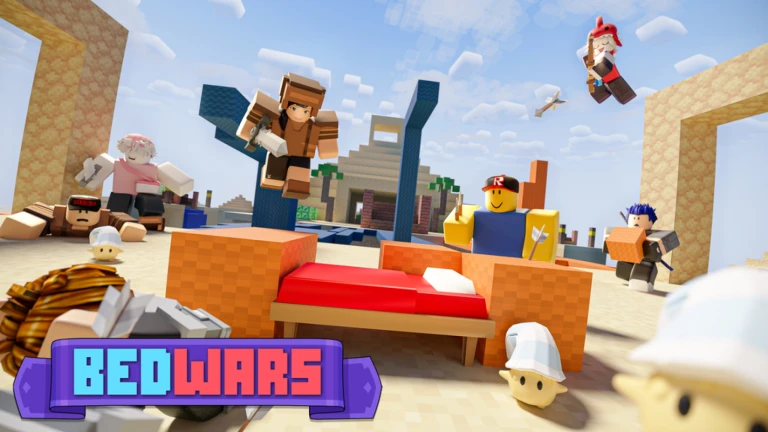
Bedwars Script is a Lua-based Roblox script designed for players who want to automate gameplay, improve combat efficiency, and progress faster in the popular Roblox game Bedwars. The game focuses on defending your bed, gathering resources, upgrading equipment, building bridges, and defeating enemy teams.
As players continue competing in matches and unlocking new kits and items, many search for automation tools that help reduce repetitive tasks and improve overall performance.
The latest Bedwars Script versions often include features such as Auto Clicker, Infinite Blocks, Teleport, Auto Farm, Kill Aura, Auto Collect Resources, Auto Buy Items, Bed ESP, Player ESP, Anti AFK, Easy GUI, and many more useful functions.
Table of Contents
What Is Bedwars Script?
Bedwars Script is a custom Lua script developed by third-party creators for the Roblox game Bedwars. It runs through a Roblox executor and provides automation features that help players gather resources, build faster, improve combat efficiency, and progress more effectively during matches.
Instead of manually repeating the same actions throughout every game, the script automates various gameplay functions while providing additional utility features.
Most versions include a user-friendly graphical interface that allows players to customize and manage different functions easily.
Download & Copy All Bedwars Script 2026
1. BedWars Script Updated VapeV4
loadstring(game:HttpGet("https://raw.githubusercontent.com/miacheats/VapeV4ForRoblox/main/NewMainScript.lua", true))(
2. Get BedWars Script – Kill Aura, GodMode
loadstring(game:HttpGet("https://raw.githubusercontent.com/warprbx/NightRewrite/refs/heads/main/Night/Loader.luau"))()
3. Script BedWars FPS Booster
-- Roblox FPS Booster Script for BedWars
-- Note: Use responsibly and ensure it complies with Roblox's terms of service.

local function fpsBooster()
    -- Set FPS cap
    setfpscap(9999)

    -- Function to remove textures
    local function removeTextures(object)
        if object:IsA("BasePart") or object:IsA("Decal") or object:IsA("Texture") then
            object:Destroy()
        end
    end

    -- Iterate through all objects to remove textures
    for _, v in pairs(workspace:GetDescendants()) do
        removeTextures(v)
    end

    -- Remove chat bubbles
    local function removeChatBubbles()
        local ChatService = game:GetService("Chat")
        ChatService.BubbleChatEnabled = false
    end

    removeChatBubbles()

    -- Change sky to grey
    local Lighting = game:GetService("Lighting")
    Lighting.Sky:Destroy()
    local newSky = Instance.new("Sky")
    newSky.Parent = Lighting
    newSky.SkyboxBk = ""
    newSky.SkyboxDn = ""
    newSky.SkyboxFt = ""
    newSky.SkyboxLf = ""
    newSky.SkyboxRt = ""
    newSky.SkyboxUp = ""
    newSky.CelestialBodiesShown = false
    newSky.SunAngularSize = 0
    Lighting.Brightness = 1
    Lighting.Ambient = Color3.fromRGB(128, 128, 128)

    -- Set player skin color to grey and remove clothes
    local function setPlayerAppearance(player)
        if player and player.Character then
            for _, part in pairs(player.Character:GetChildren()) do
                if part:IsA("BasePart") then
                    part.Color = Color3.fromRGB(128, 128, 128)
                end
            end

            -- Remove clothes
            for _, item in pairs(player.Character:GetChildren()) do
                if item:IsA("Shirt") or item:IsA("Pants") or item:IsA("ShirtGraphic") then
                    item:Destroy()
                end
            end
        end
    end

    setPlayerAppearance(game.Players.LocalPlayer)

    -- Function to modify armor and sword colors
    local function modifyGearColors(player)
        if player and player.Character then
            for _, item in pairs(player.Character:GetChildren()) do
                if item:IsA("Tool") then
                    for _, obj in pairs(item:GetDescendants()) do
                        if obj:IsA("BasePart") then
                            if math.random() > 0.4 then
                                obj.Color = Color3.fromRGB(128, 128, 128)
                            else
                                obj.Color = Color3.fromRGB(139, 69, 19)
                            end
                        end
                    end
                end
            end
        end
    end

    modifyGearColors(game.Players.LocalPlayer)

    -- Monitor for character changes
    game.Players.LocalPlayer.CharacterAdded:Connect(function(character)
        setPlayerAppearance(game.Players.LocalPlayer)
        modifyGearColors(game.Players.LocalPlayer)
    end)
end

fpsBooster()
4. Get New Free Script BedWars – OP SCRIPT AURORA
loadstring(game:HttpGet("https://raw.githubusercontent.com/cocotv666/Aurora/main/Aurora_Loader"))()
Features Of Bedwars Script
- Auto Clicker
- Infinite Blocks
- Teleport
- Auto Farm
- Kill Aura
- Auto Collect Resources
- Auto Buy Items
- Bed ESP
- Player ESP
- Anti AFK
- Easy GUI
- Fast Farming
- Auto Upgrade
- Auto Rejoin
- Auto Sprint
- Walk Speed
- Jump Power
- Performance Optimization
- Custom Settings
- Quick Navigation
Why Players Search For Bedwars Scripts
Bedwars focuses heavily on resource collection, combat, building, and team strategy. Many players search for scripts because they want:
- Faster progression
- Easier resource collection
- Reduced grinding
- Better combat efficiency
- Improved building speed
- Automatic gameplay functions
- Faster upgrades
- More convenience features
- Easier navigation
- Simplified gameplay
These reasons contribute to the popularity of scripting discussions within Roblox communities.
Benefits Commonly Advertised
- Faster progression
- Easier resource farming
- Reduced repetitive gameplay
- Better combat performance
- Faster building
- Improved efficiency
- Convenient automation tools
- Enhanced gameplay experience
- Easier item management
- Long-term progression support
The effectiveness of these features depends on the script version and game updates.
How to Use Bedwars Script
Running a script usually follows a simple process.
- Open Roblox.
- Join the Bedwars game.
- Launch a Roblox executor tool.
- Copy the script from the official website.
- Paste the Bedwars Script into the executor.
- Click on the Execute button.
- Wait for the GUI menu to appear.
- Enable the features you want to use.
Most versions provide a dashboard where players can customize settings and activate different functions.
Supported Executors
Android
- Delta
- Hydrogen
- Fluxus
- Arceus X
- Codex
iOS
- Delta iOS
- Arceus iOS
- Codex iOS
PC
- Xeno
- Wave
- Velocity
- Krnl
Compatibility may vary depending on updates and platform support.
Why Bedwars Is Popular
Bedwars is one of the most popular competitive Roblox games because it combines combat, building, teamwork, and strategy into a fast-paced multiplayer experience.
Players enjoy:
- Defending beds
- Team battles
- Resource collection
- Upgrading equipment
- Building bridges
- Unlocking kits
- Competitive gameplay
- Playing with friends
- Strategic combat
- Long-term progression
The combination of teamwork and action keeps players engaged and motivated to improve their skills.
Frequently Asked Questions (FAQs)
What is Bedwars Script?
Bedwars Script is a custom Lua script designed for the Roblox game Bedwars. It helps automate gameplay activities such as resource farming, item collection, combat actions, and progression through various utility features.
Is Bedwars Script free?
Many public versions are available for free, although some private script hubs may offer premium versions with additional features and exclusive updates.
Can Roblox ban me for using it?
Using third-party scripts may violate Roblox rules or individual game policies. Players should understand the potential risks before using any external tools.
Does it work on mobile?
Some versions support Android and iOS devices through compatible executors. Mobile compatibility depends on the executor being used and whether the script supports the latest version of the game.
Does it work after updates?
Game updates can occasionally break script compatibility. Developers typically release updated versions to restore functionality after major updates.
Do I need a paid executor?
Most scripts work with supported executors and do not specifically require paid access. However, some advanced scripts may perform better with executors that offer additional compatibility features.
Why is the script not working?
Common reasons include an outdated script version, unsupported executor, recent game updates, incorrect installation, or compatibility issues. Using the latest version and a supported executor usually resolves most problems.
Conclusion
Bedwars Script is a Lua-based Roblox automation tool commonly associated with features such as Auto Clicker, Infinite Blocks, Teleport, Auto Farm, Kill Aura, Auto Collect Resources, Auto Buy Items, Bed ESP, Player ESP, Anti AFK, and Easy GUI. These features are designed to automate repetitive gameplay activities and help players progress more efficiently.
Whether you’re trying to gather resources faster, improve combat performance, build more efficiently, or enhance your overall gameplay experience, Bedwars remains one of Roblox’s most popular competitive games, offering strategy, teamwork, action, and long-term progression.