Clean The Library Script is a Lua-based Roblox script designed for players who want to automate cleaning tasks, collect items faster, and progress more efficiently within Clean The Library. The game focuses on cleaning messy library areas, collecting books, removing trash, completing objectives, and upgrading equipment to improve cleaning performance.
As players advance through different areas, cleaning tasks can become repetitive and require significant grinding. Because of this, many players search for automation tools that can help simplify gameplay and reduce manual work.
The latest Clean The Library Script versions often include features such as Auto Clean Trash, Auto Collect Books, Fast Cleaning Mode, Auto Complete Tasks, Instant Trash Pickup, Auto Collect, Auto Tool Equip, Cleaning Speed, Auto Area Detection, No Cooldown Actions, Auto Sell Trash, Anti AFK, Auto Upgrade, and many additional utility functions.
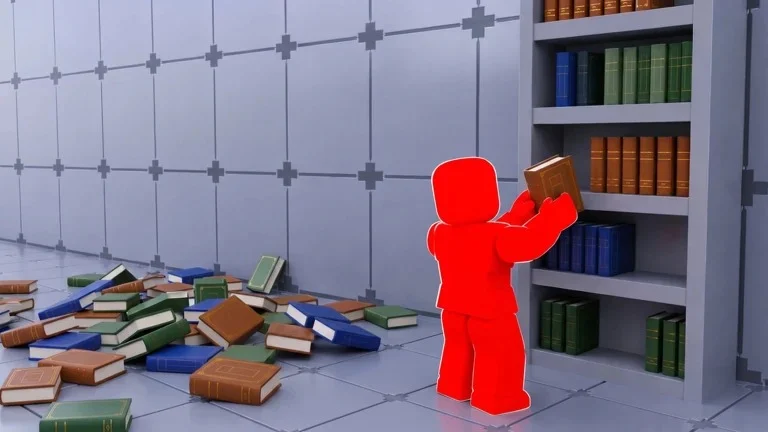
What Is Clean The Library Script?
Clean The Library Script is a custom Lua script developed by third-party creators for the Roblox game Clean The Library. It runs through a Roblox executor and provides players with automation tools that help manage cleaning activities, item collection, upgrades, and progression systems.
Instead of manually collecting trash, picking up books, and completing every cleaning task, the script automates many of these activities to improve efficiency and progression speed.
Most versions include a simple graphical user interface where players can easily activate or disable features.
Download & Copy All Clean The Library Script (2026)
Clean The library Script
-- Simple Book Organizer with Single Toggle
local Players = game:GetService("Players")
local ReplicatedStorage = game:GetService("ReplicatedStorage")
local Workspace = game:GetService("Workspace")
local CollectionService = game:GetService("CollectionService")
local UserInputService = game:GetService("UserInputService")-- Settings
local Settings = {
Enabled = false,
FastMode = false -- Optional: can add as sub-toggle
}-- GUI Creation
local function CreateUI()
local screenGui = Instance.new("ScreenGui")
screenGui.Name = "BookOrganizerGUI"
screenGui.Parent = Players.LocalPlayer:WaitForChild("PlayerGui")
-- Main Frame
local mainFrame = Instance.new("Frame")
mainFrame.Size = UDim2.new(0, 300, 0, 120)
mainFrame.Position = UDim2.new(0.5, -150, 0.5, -60)
mainFrame.BackgroundColor3 = Color3.fromRGB(25, 25, 35)
mainFrame.BackgroundTransparency = 0.05
mainFrame.BorderSizePixel = 0
mainFrame.ClipsDescendants = true
mainFrame.Parent = screenGui
-- Title
local title = Instance.new("TextLabel")
title.Size = UDim2.new(1, 0, 0, 35)
title.Position = UDim2.new(0, 0, 0, 0)
title.BackgroundColor3 = Color3.fromRGB(50, 50, 70)
title.BackgroundTransparency = 0.3
title.Text = "📚 Book Organizer"
title.TextColor3 = Color3.fromRGB(255, 255, 255)
title.TextSize = 16
title.Font = Enum.Font.GothamBold
title.BorderSizePixel = 0
title.Parent = mainFrame
-- Close Button
local closeBtn = Instance.new("TextButton")
closeBtn.Size = UDim2.new(0, 25, 0, 25)
closeBtn.Position = UDim2.new(1, -30, 0, 5)
closeBtn.BackgroundColor3 = Color3.fromRGB(200, 50, 50)
closeBtn.BackgroundTransparency = 0.5
closeBtn.Text = "✕"
closeBtn.TextColor3 = Color3.fromRGB(255, 255, 255)
closeBtn.TextSize = 14
closeBtn.Font = Enum.Font.GothamBold
closeBtn.BorderSizePixel = 0
closeBtn.Parent = mainFrame
-- Status Label
local statusLabel = Instance.new("TextLabel")
statusLabel.Size = UDim2.new(1, -20, 0, 25)
statusLabel.Position = UDim2.new(0, 10, 0, 40)
statusLabel.BackgroundTransparency = 1
statusLabel.Text = "🔴 Disabled"
statusLabel.TextColor3 = Color3.fromRGB(255, 100, 100)
statusLabel.TextSize = 14
statusLabel.Font = Enum.Font.Gotham
statusLabel.TextXAlignment = Enum.TextXAlignment.Left
statusLabel.Parent = mainFrame
-- Toggle Button
local toggleBtn = Instance.new("TextButton")
toggleBtn.Size = UDim2.new(0, 80, 0, 35)
toggleBtn.Position = UDim2.new(1, -90, 0, 70)
toggleBtn.BackgroundColor3 = Color3.fromRGB(200, 60, 60)
toggleBtn.BackgroundTransparency = 0.2
toggleBtn.Text = "START"
toggleBtn.TextColor3 = Color3.fromRGB(255, 255, 255)
toggleBtn.TextSize = 14
toggleBtn.Font = Enum.Font.GothamBold
toggleBtn.BorderSizePixel = 0
toggleBtn.Parent = mainFrame
-- Dragging
local dragging = false
local dragStart, startPos
mainFrame.InputBegan:Connect(function(input)
if input.UserInputType == Enum.UserInputType.MouseButton1 then
dragging = true
dragStart = input.Position
startPos = mainFrame.Position
end
end)
mainFrame.InputEnded:Connect(function(input)
if input.UserInputType == Enum.UserInputType.MouseButton1 then
dragging = false
end
end)
UserInputService.InputChanged:Connect(function(input)
if dragging and input.UserInputType == Enum.UserInputType.MouseMovement then
local delta = input.Position - dragStart
mainFrame.Position = UDim2.new(startPos.X.Scale, startPos.X.Offset + delta.X, startPos.Y.Scale, startPos.Y.Offset + delta.Y)
end
end)
closeBtn.MouseButton1Click:Connect(function()
Settings.Enabled = false
screenGui:Destroy()
end)
return screenGui, toggleBtn, statusLabel
end-- Main Script Logic
local gui, toggleBtn, statusLabel = CreateUI()
local isRunning = false
local currentCoroutine = nillocal Loader = require(ReplicatedStorage.Packages.Loader)
local ReplicaController = require(Loader.Shared.Utility.ReplicaController)
local BooksData = require(Loader.Shared.Data.Books)local LibraryReplica = nil
for _, r in pairs(ReplicaController._replicas) do
if r.Class == "Library" then LibraryReplica = r break end
end
if not LibraryReplica then
ReplicaController.ReplicaOfClassCreated("Library", function(replica) LibraryReplica = replica end)
while not LibraryReplica do task.wait() end
endlocal Library = Workspace.Library
local BooksFolder = Library.Books
local player = Players.LocalPlayer-- Setup Camera
player.CameraMode = Enum.CameraMode.Classic
player.CameraMinZoomDistance = 20
task.spawn(function() task.wait(0.1) player.CameraMinZoomDistance = 0.5 end)local shelfModels = {}
for _, shelfModel in ipairs(CollectionService:GetTagged("Shelf")) do
shelfModels[shelfModel.Name] = shelfModel
endlocal function getShelfAssignedSeries(shelfId)
local shelfData = LibraryReplica.Data.Shelves[shelfId]
if not shelfData then return nil end
for _, placedBook in pairs(shelfData.Books) do
local bookName = typeof(placedBook) == "Instance" and placedBook.Name or placedBook
local seriesName = bookName:match("^(.-)_(.+)$")
if seriesName then return seriesName end
end
endlocal function findShelfForSeries(seriesName, genreName, volumeCount)
for shelfId, shelfData in pairs(LibraryReplica.Data.Shelves) do
if not shelfData.Completed and shelfData.Category == genreName then
local shelfModel = shelfModels[shelfId]
if shelfModel and shelfModel:GetAttribute("Width") == volumeCount then
if getShelfAssignedSeries(shelfId) == seriesName then return shelfModel end
end
end
end
for shelfId, shelfData in pairs(LibraryReplica.Data.Shelves) do
if not shelfData.Completed and shelfData.Category == genreName then
local shelfModel = shelfModels[shelfId]
if shelfModel and shelfModel:GetAttribute("Width") == volumeCount then
if not getShelfAssignedSeries(shelfId) and next(shelfData.Books) == nil then return shelfModel end
end
end
end
endlocal function teleportTo(obj)
local char = player.Character
local root = char and char:FindFirstChild("HumanoidRootPart")
local part = obj:IsA("Model") and (obj.PrimaryPart or obj:FindFirstChildOfClass("BasePart")) or obj
if root and part then
root.CFrame = CFrame.new(part.Position + Vector3.new(0, 2, 0))
task.wait(0.05)
end
endlocal function organizeBooks()
for _, book in ipairs(BooksFolder:GetChildren()) do
if not isRunning then break end
task.wait(0.02)
local seriesName, volumeStr = book.Name:match("^(.-)_(.+)$")
local volumeNum = tonumber(volumeStr)
if seriesName and volumeNum then
local genreName, bookInfo = BooksData.GetCategory(seriesName)
if genreName and bookInfo then
local shelfModel = findShelfForSeries(seriesName, genreName, bookInfo.VolumeCount)
if shelfModel then
local shelfData = LibraryReplica.Data.Shelves[shelfModel.Name]
if not (shelfData and shelfData.Books[tostring(volumeNum)]) then
teleportTo(book)
LibraryReplica:FireServer("Grab", book)
task.wait(0.1)
teleportTo(shelfModel)
LibraryReplica:FireServer("Place", shelfModel, volumeNum - 1)
task.wait(0.4)
end
end
end
end
end
end-- Toggle functionality
local function toggleScript()
isRunning = not isRunning
if isRunning then
toggleBtn.Text = "STOP"
toggleBtn.BackgroundColor3 = Color3.fromRGB(60, 200, 60)
statusLabel.Text = "🟢 Running..."
statusLabel.TextColor3 = Color3.fromRGB(100, 255, 100)
Settings.Enabled = true
if currentCoroutine then
task.cancel(currentCoroutine)
end
currentCoroutine = task.spawn(function()
while isRunning do
local success, err = pcall(organizeBooks)
if not success then
warn("Error: " .. err)
statusLabel.Text = "❌ Error: " .. err
statusLabel.TextColor3 = Color3.fromRGB(255, 100, 100)
task.wait(2)
end
task.wait(5) -- Wait before next cycle
end
end)
else
toggleBtn.Text = "START"
toggleBtn.BackgroundColor3 = Color3.fromRGB(200, 60, 60)
statusLabel.Text = "🔴 Disabled"
statusLabel.TextColor3 = Color3.fromRGB(255, 100, 100)
Settings.Enabled = false
if currentCoroutine then
task.cancel(currentCoroutine)
currentCoroutine = nil
end
end
endtoggleBtn.MouseButton1Click:Connect(toggleScript)-- Cleanup
game:GetService("Players").LocalPlayer:WaitForChild("PlayerGui").ChildRemoved:Connect(function(child)
if child.Name == "BookOrganizerGUI" and isRunning then
isRunning = false
if currentCoroutine then
task.cancel(currentCoroutine)
end
end
end)print("✅ Book Organizer loaded! Click START to begin organizing.")
Features Of Clean The Library Script
- Auto Clean Trash
- Auto Collect Books
- Fast Cleaning Mode
- Auto Complete Tasks
- Instant Trash Pickup
- Auto Collect
- Auto Tool Equip
- Cleaning Speed
- Auto Area Detection
- No Cooldown Actions
- Auto Sell Trash
- Anti AFK
- Auto Upgrade
- Auto Farm
- Auto Collect Rewards
- Auto Rejoin
- Fast Progression
- Performance Optimization
- Easy GUI Controls
- Custom Settings
Why Players Search For Clean The Library Scripts
Clean The Library requires players to continuously collect trash, organize books, upgrade equipment, and complete objectives. Many players search for scripts because they want:
- Faster progression
- Easier cleaning
- Reduced repetitive gameplay
- Automatic task completion
- Faster upgrades
- Better farming efficiency
- Automatic reward collection
- Improved AFK progression
- More convenience features
- Simplified gameplay
These reasons contribute to the popularity of scripting discussions within the Roblox community.
Benefits Commonly Advertised
- Faster cleaning speed
- Reduced manual grinding
- Easier task completion
- Better farming efficiency
- Automatic item collection
- Faster upgrades
- Improved progression
- Automatic reward claiming
- Convenient automation tools
- Enhanced gameplay experience
The effectiveness of these features depends on the specific script version and game updates.
How to Use Clean The Library Script
Running a script usually follows a simple process.
- Open Roblox.
- Join the Clean The Library game.
- Launch a Roblox executor tool.
- Copy the script from the official website.
- Paste the Clean The Library Script into the executor.
- Click on the Execute button.
- Wait for the GUI menu to appear.
- Enable the features you want to use.
Most versions include an easy-to-use dashboard where players can configure settings and activate different functions.
Supported Executors
Clean The Library Script is commonly advertised as compatible with:
- Delta Executor
- Hydrogen
- Fluxus
- Wave
- Xeno
- Arceus X
- KRNL
- Synapse X
Compatibility may vary depending on updates and platform support.
Why Clean The Library Is Popular
Clean The Library has gained popularity because of its satisfying progression system and relaxing cleaning gameplay.
Players enjoy:
- Cleaning environments
- Collecting books
- Removing trash
- Completing objectives
- Unlocking new areas
- Upgrading equipment
- Earning rewards
- Progression systems
- Casual gameplay
- Long-term advancement
The combination of simple mechanics and rewarding progression makes the game enjoyable for many Roblox players.
Frequently Asked Questions (FAQs)
What is the Clean The Library Script?
Clean The Library Script is a custom Lua script designed for the Roblox game Clean The Library. It automates cleaning activities, item collection, upgrades, and progression-related tasks.
Is it free?
Most public versions are available for free, although some private script hubs may offer premium versions with additional features.
Do I have to go through a key system?
Some versions are keyless, while others may require completing a key system before access is granted.
What do I need to run the script in Roblox?
You typically need a compatible Roblox executor that supports Lua script execution.
Can I run a Clean The Library Script without an executor?
No. Most Roblox scripts require a supported executor in order to function.
Does it work on mobile devices?
Some versions support Android and iOS executors, although compatibility depends on the device and executor being used.
What does Auto Clean Trash do?
Auto Clean Trash automatically collects and removes trash throughout the library without requiring manual interaction.
What does Auto Collect Books do?
Auto Collect Books automatically gathers books and other collectible items found around the map.
Is using it completely safe?
Players should understand that third-party scripts may involve security risks, compatibility issues, and potential account-related consequences.
Conclusion
Clean The Library Script is a Lua-based Roblox automation tool commonly associated with features such as Auto Clean Trash, Auto Collect Books, Fast Cleaning Mode, Auto Complete Tasks, Instant Trash Pickup, Auto Collect, Auto Tool Equip, Cleaning Speed, Auto Area Detection, No Cooldown Actions, Auto Sell Trash, Anti AFK, and Auto Upgrade. These features are designed to automate repetitive cleaning tasks and help players progress more efficiently.
Whether you’re trying to clean faster, unlock upgrades, collect more rewards, or simply reduce repetitive gameplay, Clean The Library remains an enjoyable Roblox experience that combines casual progression, collection mechanics, and satisfying cleaning gameplay into a rewarding adventure.